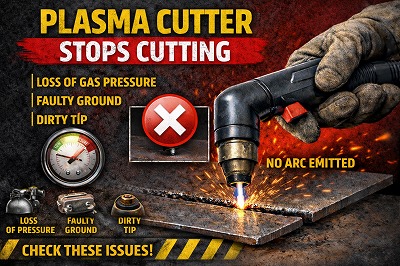
If your plasma cutter stops cutting mid-job, it can be frustrating and disruptive—especially when you’re in the middle of an important task. This issue is quite common among UK users and can be caused by anything from overheating and air supply problems to worn consumables or power issues.
The good news? In most cases, the problem is easy to diagnose and fix.
In this complete guide, we’ll cover:
- The most common reasons why your plasma cutter stops cutting
- Step-by-step solutions
- Preventive tips to avoid future issues
⚠️ Signs Your Plasma Cutter Stops Cutting
Before troubleshooting, confirm these symptoms:
- ❌ Arc starts normally but stops during cutting
- ❌ Machine shuts off unexpectedly
- ❌ Cutting becomes inconsistent
- ❌ Arc cuts in and out
- ❌ Stops after a few seconds or minutes
👉 These indicate an interruption in power, airflow, or system stability.
Plasma Cutter Stops Cutting – Common Causes & Fixes
🔹 1. Overheating & Duty Cycle Limit Reached
❌ Why It Happens:
- Every plasma cutter has a duty cycle (e.g., 60% at 40A = 6 minutes cutting, 4 minutes cooling)
- Continuous cutting exceeds this limit
- Internal components overheat
🔍 Symptoms:
- Machine suddenly stops cutting
- Cooling fan runs loudly
- Warning light (on some models)
- Cutting resumes after cooling
✅ Fix:
- Stop cutting and allow machine to cool fully
- Follow duty cycle guidelines strictly
- Reduce amperage if doing long cuts
- Ensure proper ventilation around machine
👉 Pro Tip: Overheating is the #1 cause of plasma cutters stopping mid-job.
🔹 2. Air Pressure Drop During Cutting
❌ Why It Happens:
- Compressor cannot maintain airflow (CFM) under load
- Air pressure drops while cutting
- Hidden leaks reduce pressure
🔍 Symptoms:
- Arc weakens before stopping
- Cutting becomes inconsistent
- Compressor runs continuously
- Machine may show pressure warning
✅ Fix:
- Set pressure correctly (60–90 PSI under load)
- Use compressor with sufficient CFM
- Check for leaks in hoses and fittings
- Avoid long or narrow air lines
👉 Pro Tip: Always test pressure while cutting, not when idle.
🔹 3. Worn or Damaged Consumables
❌ Why It Happens:
- Electrode wears down over time
- Nozzle opening enlarges
- Arc becomes unstable
🔍 Symptoms:
- Arc starts fine but becomes inconsistent
- Cut quality deteriorates
- Arc cuts in and out
✅ Fix:
- Inspect:
- Electrode (look for pitting)
- Nozzle (check shape and size)
- Replace consumables regularly
- Use high-quality parts
👉 Pro Tip: Worn consumables can cause intermittent arc failure, not just poor cuts.
🔹 4. Poor Ground (Earth) Connection
❌ Why It Happens:
- Clamp attached to:
- Rust
- Paint
- Dirty surface
- Loose connection
🔍 Symptoms:
- Arc starts but drops out
- Inconsistent cutting
- Intermittent stopping
✅ Fix:
- Attach clamp to clean, bare metal
- Grind surface if necessary
- Ensure tight and secure connection
👉 Pro Tip: A weak ground can interrupt the arc even if everything else is correct.
🔹 5. Power Supply Instability
❌ Why It Happens:
- Voltage drop from long extension leads
- Shared circuits with other tools
- Undersized wiring
🔍 Symptoms:
- Machine cuts, then suddenly stops
- Reduced arc power before shutdown
- Flickering or unstable performance
✅ Fix:
- Plug directly into mains (UK 230V)
- Avoid long or thin extension leads
- Use dedicated circuit if possible
👉 Pro Tip: Power fluctuations often mimic other faults.
🔹 6. Moisture or Contaminated Air
❌ Why It Happens:
- Water in compressed air
- Lack of air dryer/filter
- Humid conditions
🔍 Symptoms:
- Arc becomes unstable before stopping
- Excessive slag
- Short consumable life
✅ Fix:
- Install moisture separator and air dryer
- Drain compressor tank daily
- Use desiccant filters for best results
👉 Pro Tip: Moisture can disrupt arc consistency and cause sudden stoppages.
🔹 7. Incorrect Cutting Speed
❌ Why It Happens:
- Moving too fast → arc cannot penetrate
- Moving too slow → excessive heat and instability
🔍 Symptoms:
- Arc cuts out mid-line
- Incomplete cuts
- Irregular cutting pattern
✅ Fix:
- Maintain steady, controlled speed
- Watch sparks:
- Downward = correct speed
- Adjust based on material thickness
👉 Pro Tip: Speed control directly affects arc stability.
🔹 8. Torch Height & Positioning Issues
❌ Why It Happens:
- Torch too far from material
- Inconsistent hand movement
- No guide used
🔍 Symptoms:
- Arc weakens and stops
- Wide or uneven cuts
- Loss of arc contact
✅ Fix:
- Maintain 2–4 mm standoff distance
- Use drag shield if available
- Keep consistent torch angle
👉 Pro Tip: Distance affects arc strength more than most users realise.
🔹 9. Torch, Cable, or Connection Faults
❌ Why It Happens:
- Damaged torch cable
- Loose internal connections
- Worn trigger switch
🔍 Symptoms:
- Arc stops suddenly
- Cutting resumes when moving cable
- Intermittent performance
✅ Fix:
- Inspect torch and cable for damage
- Tighten all connections
- Replace faulty parts
👉 Pro Tip: Cable faults often cause intermittent stopping issues.
🔹 10. Internal Machine Protection or Fault Mode
❌ Why It Happens:
- Machine detects unsafe condition
- Built-in protection activates
🔍 Symptoms:
- Machine shuts down mid-cut
- Error codes or warning lights
- Requires reset
✅ Fix:
- Turn off and reset machine
- Check manual for error codes
- Contact manufacturer if persistent
👉 Pro Tip: Always rule out external causes before assuming internal faults.
Step-by-Step Troubleshooting Checklist
- ✅ Check duty cycle / overheating
- ✅ Verify air pressure
- ✅ Inspect consumables
- ✅ Check grounding
- ✅ Test power supply
- ✅ Inspect torch and cables
👉 These steps fix most issues.
Pro Tips to Prevent Cutting Interruptions
- Maintain proper airflow
- Replace consumables regularly
- Keep machine cool
- Use stable power
- Follow correct settings
❌ Common Mistakes to Avoid
❌ Ignoring overheating
✔ Allow cooling time
❌ Using worn parts
✔ Replace early
❌ Poor air setup
✔ Maintain system
Safety Tips
- Turn off machine before inspection
- Wear PPE
- Avoid overheating
❓ FAQs
Why does my plasma cutter stop mid-cut?
Usually due to overheating, air issues, or worn consumables.
Can air pressure cause cutting to stop?
Yes — very common.
How do I fix it quickly?
Check air, consumables, and cooling.
Should I replace consumables often?
Yes, for consistent performance.
Final Thoughts
If your plasma cutter stops cutting, the issue is usually caused by overheating, airflow problems, or worn components. By following this guide, you can quickly identify the problem and restore smooth, reliable cutting performance.
Leave a Reply